1 Why Language Matters
The numbers are only half the story. How you present your tiers to students has a measurable effect on which tier they choose and how they feel about the choice. Woolly Mammoth Theatre in Washington, D.C. found that changing their pricing language, specifically the way they anchored and framed their tiers, improved yield by roughly 40%. The prices didn't change. The words did.
The Class Price Calculator includes a built-in language generator that produces ready-to-paste pricing copy in three different styles. Each style frames the same tier prices with different emphasis and tone, so you can pick the one that fits your organization's voice and your audience's expectations.
2 Where to Find It
Mode note: Tier Language is an Advanced mode feature. Even with tiered pricing enabled, the language section is hidden in Simple mode. Flip the header toggle to Advanced to see it.
The Tier Language section appears in the results panel after you've calculated scenarios with tiered pricing enabled. Scroll past the sustainability and predicted distribution tables and you'll find it. If tiered pricing is not enabled, this section won't appear.
The section shows three tabs, one for each style. Each tab displays the generated copy and a "Copy" button.
3 The Three Styles
Warm & Mission-Centered
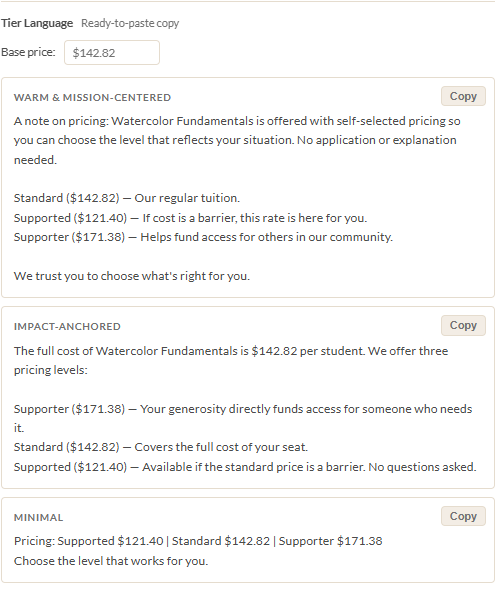
This style leads with your organization's values. It opens with "A note on pricing" and emphasizes self-selection, trust, and community. The tone is personal and welcoming. Use this style when your audience values mission alignment and you want to signal that accessibility is core to who you are, not an afterthought.
A note on pricing: Intro to Watercolor is offered with self-selected pricing so you can choose the level that reflects your situation. No application or explanation needed.
Impact-Anchored
This style leads with the full cost of the class and frames the supporter tier as a way to directly fund access for someone else. The tone is transparent and concrete. When supporters see "your generosity directly funds access for someone who needs it," they understand exactly where the extra money goes. Use this style when your audience responds to directness and tangible impact.
Minimal
Just the prices and a single line: "Choose the level that works for you." No narrative, no emotional framing. This is the right choice for contexts where space is limited (a Sawyer listing, a social media post) or when your audience prefers simplicity over storytelling.

4 Base Price Override
The calculator might produce a price like $172.53. That's mathematically correct, but it's not what you want on a registration page. Below the style tabs, you'll find a Base price field where you can enter a round number like $175.
When you enter a base price override, all three styles recalculate their tier prices from your override instead of the calculator's raw number. The supported and supporter prices adjust proportionally using the same discount and premium percentages. Below the field, a note shows the calculator's original price for reference so you can see how far your override departs from the cost-based number.
Rounding to clean numbers is almost always the right call for public-facing pricing. $175 is easier to remember, easier to type into a payment form, and feels more intentional than $172.53.
5 Two-Tier Auto-Detection
If your Supporter Premium is set to 0%, the language generator automatically drops the supporter line from all three styles. You don't need to do anything special. The generator detects that the supporter tier doesn't exist and produces two-tier copy instead of three.
This is particularly useful if you use a booking system like Sawyer that only supports two pricing levels (a standard price and a single promo code for the supported price). The generated copy will list just the Standard and Supported tiers, ready to paste into your listing.
If you're using 4-tier mode, the generator includes lines for each scholarship tier with differentiated descriptions. Each style handles the second supported tier with language that distinguishes it from the first ("a reduced rate if cost is a barrier" vs. "a deeper reduction if a larger discount makes the difference").
6 Copy and Paste
Click the "Copy" button on any style tab to copy the generated text to your clipboard. From there, paste it into wherever your students will see it:
- Your Sawyer or Amilia class listing
- Your website's registration page
- A confirmation or reminder email
- A social media post announcing the class
- A printed flyer or poster
The copy is plain text, not HTML, so it works everywhere. You may want to add formatting (bold, line breaks) depending on the platform, but the words themselves are ready to go.
Tip: Try all three styles and see which one feels right for each context. You might use the Warm style on your website, the Impact style in emails, and the Minimal style in a Sawyer listing. They all describe the same prices. The framing just changes to match the medium.
Ready to price your next class?
Open the Class Price Calculator and put this guide into practice.
Open the Calculator